Google is showing a WhatsApp button on some Business Profiles. Learn how to check availability, set up messaging and turn conversations into enquiries.
WhatsApp Button on Google: Customers Can Message You Directly from Search
A WhatsApp button on Google can shorten the journey from “I found this business” to “Let me ask about availability.” Some Business Profiles now display a dedicated WhatsApp button alongside familiar options such as calling, getting directions and visiting the website.
In this article from Grow Easy, we explain what is confirmed, how to check your profile and how to prepare your team for incoming messages.
For your business, this creates another opportunity to start a conversation with a potential customer. But an easy way to get in touch only helps when someone is ready to respond. Before adding your number, decide what should happen after the first “Hello.”
What Do We Know About the WhatsApp Button on Google?
On 7 October 2026, Search Engine Roundtable reported a WhatsApp button appearing in business panels within Google Search. According to the report, it can appear as an additional contact option or replace the existing chat button. Sachin Patel spotted the change, and author Barry Schwartz reproduced it.
Connecting WhatsApp to a Business Profile was already possible. The news concerns how that contact option appears in search results. The report does not establish a complete geographical rollout, so it would be premature to say the button is available to every business.
Google’s official help documentation says chat options are available in selected regions for claimed and verified profiles. The practical next step is to check what your own profile supports.

Why Could This Matter to Your Customers?
Imagine someone searching for a garage, a salon or somewhere to have dinner. They have checked the address and reviews but still have one question: “Are you open on Saturday?”, “Do you have an appointment tomorrow?” or “Can I book a table for six?”
If they prefer messaging, a direct conversation can save them from finding a contact form or waiting until they can make a call. You get an opportunity to help while their interest is still there.
Of course, not every conversation will become a sale. Some people are comparing options; others are checking availability. The value lies in making communication easier and helping the customer take the next step.
How Can You Check Whether WhatsApp Is Available?
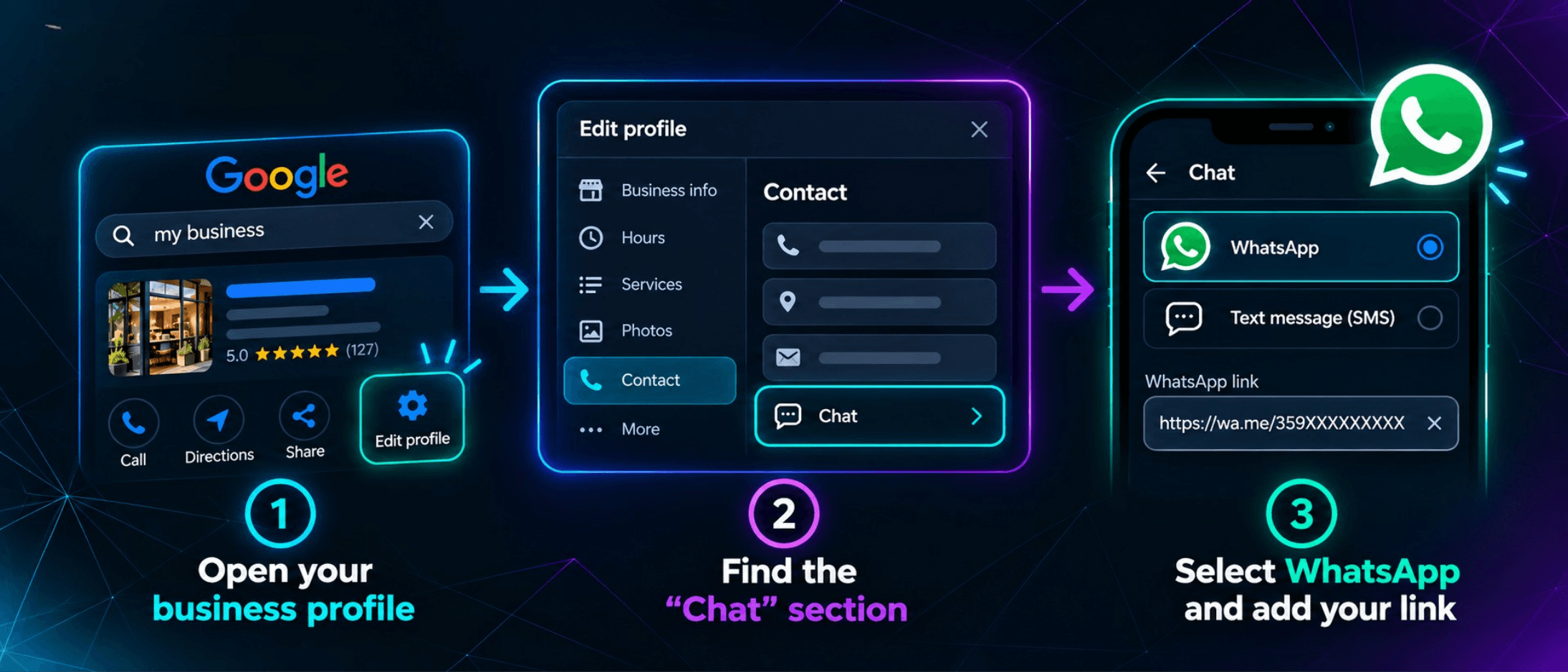
Sign in with the Google account that manages your business and open your Business Profile settings. Then:
- Select Edit profile and open Contact.
- Find Chat and select the edit option.
- Choose WhatsApp, if available.
- Add your WhatsApp click-to-chat link and save.
Google asks for a chat link for this option. Entering your main business phone number alone does not complete the setup. Its documentation also states that if you add both WhatsApp and text messaging, only the text messaging option will be shown to customers.
If the field is missing, that does not automatically mean something is wrong with your profile. Availability is limited. Meanwhile, make sure your other contact details are accurate.
Test What Your Customer Actually Sees
After saving, open the public profile on your phone and test any available button. Check that it opens a conversation with the correct business and that the message reaches the person responsible for replying.
This is part of effective Google Business Profile management. Your address, opening hours, services and contact information should tell a consistent story, wherever the customer starts their conversation.
Who Will Reply When Someone Messages You?
Answer this before activating the option. If the number is checked only when someone has spare time, a new contact channel can quickly become another place where enquiries go unanswered.
Assign a person to manage messages, agree on response hours and arrange cover for absences. You do not need to promise instant replies around the clock. A realistic response time that your team can maintain is more useful.
Prepare short answers to common questions about prices, availability, bookings, location and conditions. Use them as starting points, then address the actual enquiry. Someone asking about an appointment tomorrow does not need your entire company introduction first.
Finish with a clear next step. Offer an available time, ask for the information needed to prepare a quote or share the relevant page. Help the customer understand what happens next.
How Can You Tell Whether WhatsApp Is Delivering Results?
Message volume is a starting point, but it does not show the channel’s value on its own. During the first month, keep a simple record of enquiries, time to first response, confirmed bookings and completed sales.
Ten conversations that lead to three appointments may be more valuable than fifty questions that go nowhere. Record why enquiries do not progress, too: unavailable appointments, an unsuitable service or unclear pricing. These patterns can help improve your offer and your replies.
A conversation that moves directly from Google to WhatsApp does not automatically register as a website visit. Our Google Analytics services help businesses understand website activity, but evaluating this contact channel also requires information from the people handling enquiries.
What Should You Avoid Expecting from the Button?
A WhatsApp button is not a promise of higher rankings. It makes contacting your business easier, but you still need clear service information, an accurate profile and useful website content.
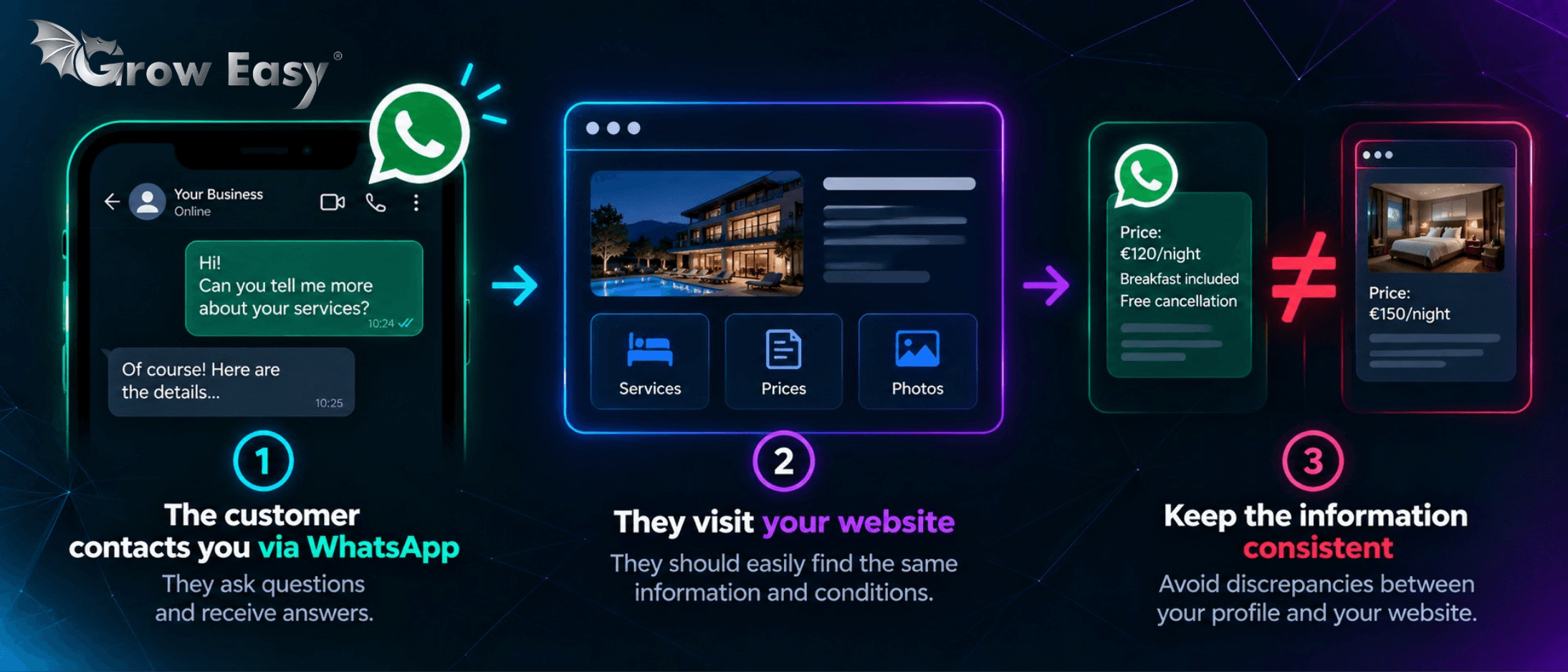
If someone receives an answer and then visits your website, they should find matching information and conditions. That is why website SEO and Business Profile maintenance should work together. Conflicting details create unnecessary questions just when a customer is deciding whether to buy.
Turn an Easy Contact Option into a Useful Conversation
The WhatsApp button on Google is worth checking, particularly if your customers often prefer messaging to calling. Start with availability, test the correct contact and organise who will respond. Then follow what happens to the enquiries you receive.
If you want to understand where your business loses opportunities between a search and the first conversation, get in touch with us.
We can discuss your profile, website and customer contact process to identify the improvements that make sense for your business!